How To Choose UI Before You Build: Turning PRDs Into Real Designs With Omniflow
 For years, product teams have followed the same familiar path: Write a product requirements document (PRD), hand it off to design, pass it to engineering, and hope everyone interprets it the same way.
On paper, this workflow makes sense. In practice, it’s one of the biggest reasons digital products move slower than they should.
Great ideas get stuck in translation. Interfaces evolve mid-build. Timelines slip. Budgets stretch. And teams spend more time fixing misunderstandings than building great software.
Choosing your UI and UX design before you write a single line of code changes everything. For the better!
Omniflow's approach to product development fundamentally transforms interface design, making it more intentional and aligned right from the start.
And with Omniflow’s latest update, it’s finally possible.
The Problem: Where Traditional Product Workflows Break Down
Most product teams still rely on linear handoffs: Product managers document requirements. Designers translate those requirements into mockups. And finally, software engineers convert designs into working software.
Each of these steps is traditionally seen as essential. But all these handoffs introduce friction into the UI design process.
PRDs rarely capture every nuance of intent. Designers must interpret abstract descriptions. Engineers must reverse-engineer design decisions.
By the time code is written, the original vision has often been diluted, changed, or complex elements are missed entirely. What started as a clear idea becomes a series of compromises.
Even worse, feedback usually arrives late. Stakeholders don’t fully understand the product until they see it running. But by then, changes are expensive, both financially and in terms of how much work it takes to go back in and fix things.
This is why user interfaces rarely stay stable during development. The user interface often shifts as new insights emerge, users react, assumptions break down, and teams try their best to get things right.
But the problem is that every shift costs time, money, and manual labor.
The Hidden Cost of Late User Interface Changes
Changing interface decisions after development begins is one of the most expensive mistakes in product creation.
Once a prototype or usable app is created, going back to change key elements, vertical spaces, or even just a button can cause sometimes a ridiculous amount of work. Even just a small tweak to visual elements can trigger:
Entire layout rewrites
Component redesigns
State management changes
Regression testing
Documentation updates
What looks like a simple edit on the surface often ripples through the entire system and requires a lot of manual work to straighten out.
Beyond technical costs, late changes damage momentum. Teams lose confidence. Deadlines move. Energy drains from the project.
Over time, this creates a culture of caution instead of innovation. It slows everybody down, kills morale, and teams sometimes stop experimenting because that feels risky and potentially costly.
 Wondering about the difference between Lovable, Omniflow and other similar no-code development tools? Click here to read our full breakdown on Lovable vs Omniflow and learn how to choose the best AI product agent.
Omniflow’s New Approach: From PRD to UI Design Process Instantly Without
Omniflow’s latest update eliminates this bottleneck.
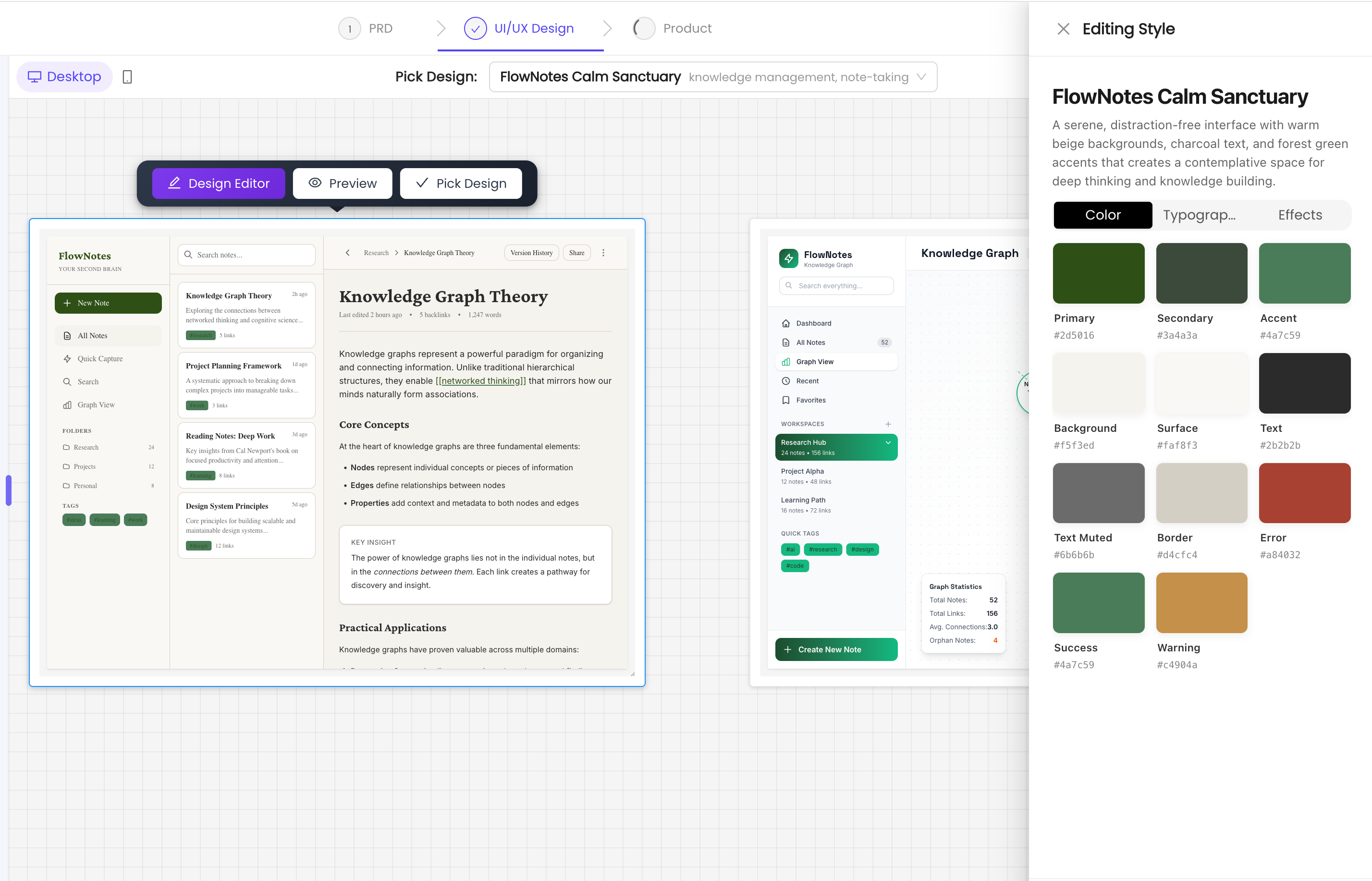
Your PRD now flows directly into UI/UX design, generating real interface variations you can see, compare, and choose from—before writing code.
Then, you can use Omniflow Prototyping tool, similar to Figma, Axure, Proto.io, and Principle, to interact with and refine these interface UI variations, ensuring the best user experience before development begins.
Instead of imagining how user interface elements might look, you see them.
Instead of debating abstractions, you evaluate real layouts.
Instead of waiting weeks for mockups, you get options immediately.
Omniflow enables product requirements documents that evolve alongside your product and the UI design principles that matter to your product. It transforms your PRD from a static document into a living foundation for product design.
No More Lost Context Between UI Designer Teams and User Flows
One of the biggest challenges in software development is context loss.
By the time requirements reach engineering, they’ve passed through multiple interpretations. Each translation introduces noise, friction, and the chance for ideas to be misinterpreted.
Omniflow removes that friction.
There is no re-interpretation. No “that’s not what I meant.” Just shared context from idea to build.
Product intent, design structure, and technical implementation remain aligned from the start.
Everyone works from the same source of truth. And that means teams get a better, more efficient development process, and end-users get better products, even faster.
 Why Choosing Interface Design Early Changes Everything
When teams choose their interface before development begins, the entire process accelerates.
Early UI selection enables:
Faster stakeholder alignment
Clearer development scope
Fewer revisions
More confident execution
Reduced technical debt
Instead of building UI components first and adjusting later, teams validate ideas first and build with certainty.
This shifts product development from reactive to intentional.
You’re no longer fixing mistakes after user testing. You’re executing a plan, right from the start.
Real Impact for Modern Product Teams and User Experience
For startups, this means faster MVP validation and quicker market entry.
For agencies, it means smoother client approvals and fewer revisions.
For enterprises, it means scalable workflows and predictable delivery.
Across industries, Omniflow helps teams move from concept to launch with clarity.
It replaces fragmented collaboration with a unified creation process in a reliable and easy way.
Building With Clarity From Day One
For too long, product creation has been slowed by manual handoffs and lost context. UI decisions have been postponed until it was too late to change them efficiently.
Omniflow changes that.
By turning PRDs into visual, comparable, and pretty UI packages right from the start, teams can choose the right interface before they build.
The result is faster development, stronger alignment, and better products.
If you want to stop guessing how your product should look—and start building with confidence—choosing your UI early is no longer optional.
With Omniflow, it’s built in.
Ready to try it out for yourself? Sign up today and try Omniflow for FREE!
 FAQ Section - How To Get UI Elements Right From The Start
What does it mean to choose UI before building software?
Choosing UI before building means finalizing your product’s interface and user task experience during the planning stage—before any development begins. This helps teams validate layouts, workflows, and usability early, reducing costly changes later.
How does Omniflow turn PRDs into UI designs?
Omniflow analyzes your product requirements document and automatically generates multiple visual interface variations. These designs reflect your functional goals, user flows, and feature priorities—allowing you to compare and select the best option instantly.
Do I still need designers if I use Omniflow?
Yes. Omniflow doesn’t replace designers—it empowers them. Designers can start with AI-generated layouts complete with branding elements, refine them, and focus on higher-level UX strategy instead of rebuilding interfaces from scratch.
Can non-technical founders use Omniflow?
Absolutely. Omniflow is built for founders, product managers, and business teams who may not have coding or design backgrounds. It helps translate ideas into real interfaces without requiring technical expertise.
How does early UI selection reduce development time?
When UI decisions are made upfront, engineers don’t need to redo layouts, components, or workflows later. This eliminates rework, speeds up implementation, and keeps projects on schedule.
Is Omniflow suitable for building MVPs?
Yes. Omniflow is especially useful for MVP development. It helps teams visualize products quickly, validate ideas early, and launch faster without wasting resources on untested designs.
Can I customize the generated UI designs?
Yes. All generated designs can be refined, edited, and customized. Teams can adjust layouts, branding, and functionality to match their exact product vision.
How is Omniflow different from traditional prototyping tools?
Traditional tools require manual wireframing and design work. Omniflow automatically generates real interface variations directly from your PRD, keeping product, design, and engineering aligned from the start.
Does Omniflow help prevent miscommunication between teams?
Yes. By creating shared visual references early, Omniflow reduces misunderstandings between product managers, designers, and developers. Everyone works from the same source of truth.
Can Omniflow be used for enterprise-scale products?
Yes. Omniflow supports both early-stage startups and large teams. Its structured workflows and shared context make it ideal for scaling complex software projects.