OmniflowDocs & Guides
UI/UX Design System
Transform product requirements into production-ready design systems with AI-powered generation, interactive previews, and comprehensive design token management.
AI-Powered Design Generation
Transform your PRD documents into professional design systems in seconds. Our AI-powered design tool generates multiple style variations complete with comprehensive design tokens and interactive demo pages.
- Multi-Style Generation: Generate 2-3 design style variations from your PRD in under a minute, allowing you to explore different visual directions quickly.
- Comprehensive Design Tokens: Each design includes a complete token system based on Tailwind CSS v4, covering colors (11 tokens), typography (fonts, sizes, weights), spacing, shadows, borders, and effects.
- Interactive Previews: See your design in action with auto-generated demo pages that showcase the design system with real UI components.
- Context-Aware: Uses your PRD content and organizational design guidelines to generate designs that align with your product requirements.
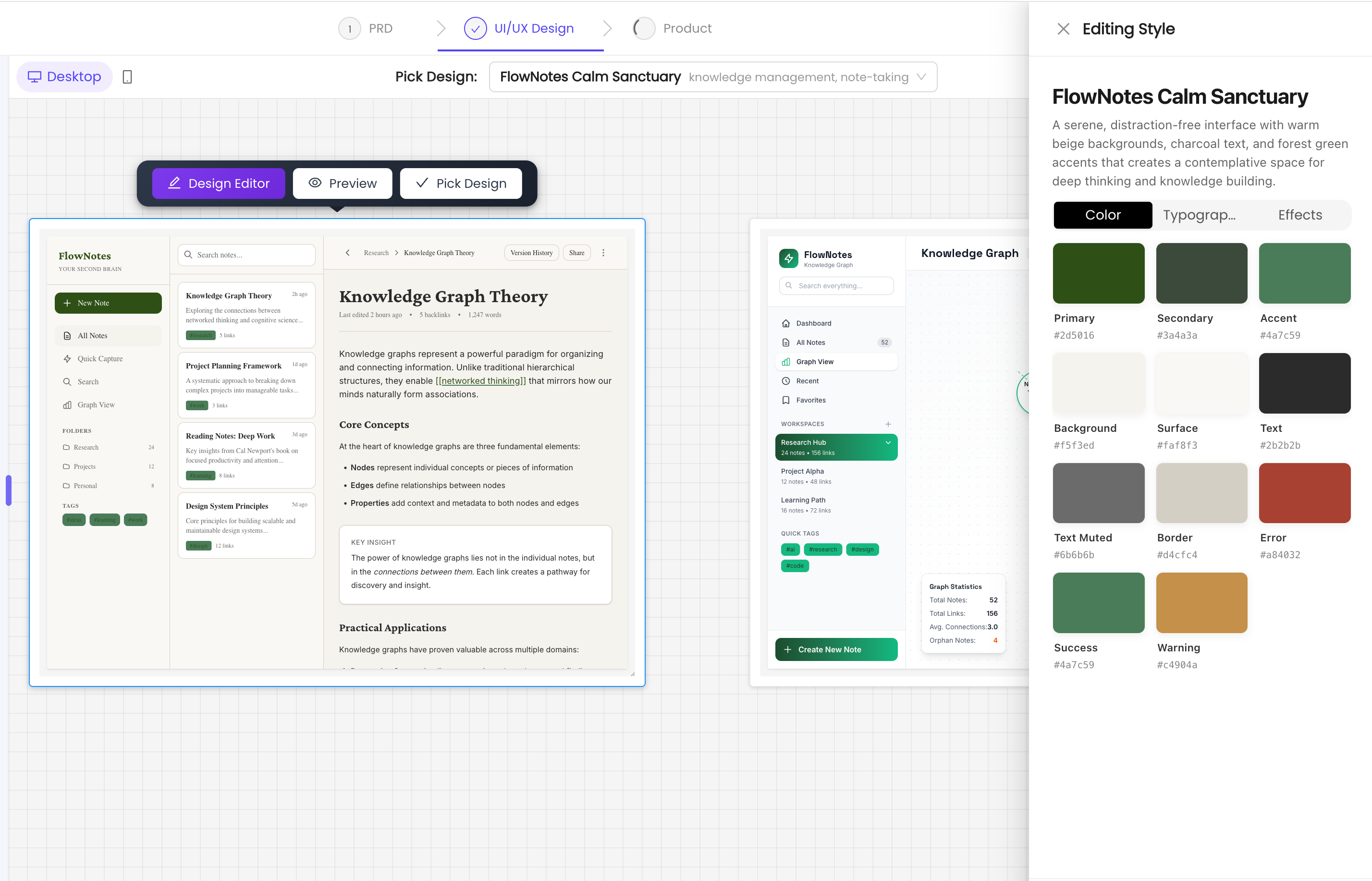
Visual Design Canvas
Review and compare design variations on an interactive infinite canvas:
- Side-by-Side Comparison: View multiple design styles simultaneously with style guide and demo page for each variation.
- Interactive Canvas: Pan, zoom (10%-200% scale), and focus on specific designs for detailed review.
- Responsive Preview: Toggle between desktop and mobile views to ensure your design works across all devices.
- Focus Mode: Click to center on a specific design for detailed examination.
Real-Time Design Token Editor
Fine-tune your selected design with our built-in visual editor:
- Live Editing: Adjust colors, typography, spacing, and effects with instant preview updates.
- Three-Tab Interface: Organized editing panels for Colors, Typography, and Effects.
- Smart Updates: Changes automatically propagate to demo pages with atomic updates to prevent race conditions.
- Professional Tools: Color picker with hex codes, font family selection, numeric inputs for precise control.
Getting Started with UI/UX Design
Create and customize your design system:
- Navigate to your PRD document in the Documents section.
- Chat with the AI Agent: "Create UI design based on this PRD"
- Review the 2-3 generated design variations on the interactive canvas.
- Use pan, zoom, and responsive preview to examine each design in detail.
- Select your preferred design or request regeneration with specific feedback.
- Optional: Fine-tune design tokens using the real-time editor (adjust colors, typography, spacing).
- Preview and share your design via public URLs or QR codes for mobile review.
- Continue to the Prototype phase to build your application with the selected design system.
Design System Standards
Our design token system follows industry best practices:
- Tailwind CSS v4 Compatible: All design tokens are structured for seamless integration with Tailwind CSS development workflows.
- Complete Token Coverage: Includes color palette (11 tokens), typography system (4 font families, 8 size scales, 5 weight levels), layout spacing (7 levels), border radius (6 options), shadows (5 levels), and responsive breakpoints.
- Code-Ready Output: Design tokens are exported as structured JSON data, ready for developer handoff and implementation.
- Consistent Design Language: Establish a unified visual system that scales across your entire product.